Retrospectives
Writing
Write cards in the columns, alone, before anyone reads them.
In the Writing phase everyone writes cards in the columns of the board. Nobody reads the cards of the others until the facilitator moves to Grouping. This page covers writing, editing and deleting a card, what the others see meanwhile, anonymity, and how the facilitator changes the columns.
Write a card
- Select Add a card at the bottom of a column, or press N.
- Type your card, 280 characters at most.
- Press Enter or select Save. Shift+Enter starts a new line.
- The field stays open for your next card. Press Esc or select Cancel when you are done.
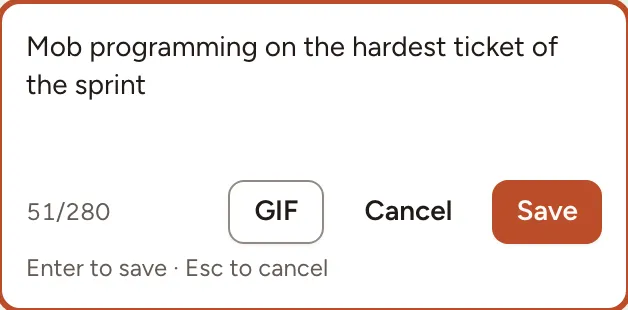
The GIF button attaches a GIF to the card, alone or with text. It is there only when the instance has a GIF provider configured and Allow GIFs is on in the session settings.
Observers of the team follow the board without writing.
Edit or delete your card
Each of your cards carries a pencil (Edit card) and a bin (Delete card). You can change or remove your own cards during Writing and Grouping, not afterwards, and never the cards of someone else.
What the others see
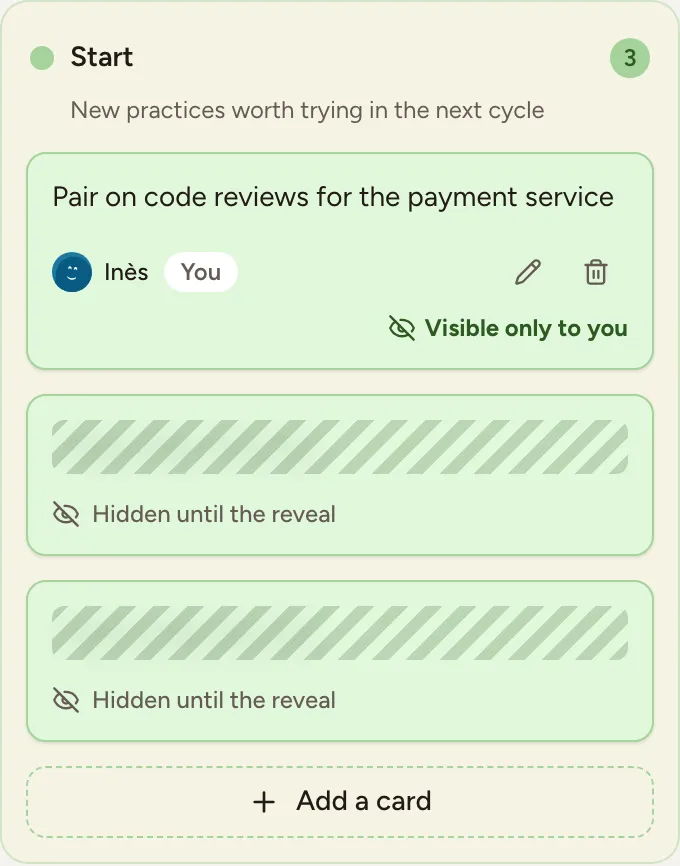
- Your cards are marked Visible only to you.
- The cards of the others appear as striped placeholders, Hidden until the reveal. You see how many there are, not what they say or who wrote them. This holds for the facilitator too.
- The line above the columns counts the cards and how many of the people present have written, for example “8 cards · 6/6 have written”.
- While you type, the others see that you are writing a card, not its text.
Everything is revealed when the facilitator moves the board to Grouping.
Anonymous cards
When Anonymous cards is on, the author of a card is never shown to anyone else, in any phase, and the board says how many people are writing instead of naming them. The facilitator’s bar shows Anonymity: on or Anonymity: off during Writing.
The facilitator turns it on when creating the retrospective or in the session settings. It can be turned off again only while the board has no card and nobody has answered a survey or the health check of the retro.
Lock the board
The facilitator can select Lock board in the bar at the bottom. While the board is locked nobody can add or edit a card, and the header shows that the board is closed for editing. Select it again to unlock.
Manage the columns
The facilitator can change the columns during the Icebreaker and Writing phases:
- Add column, at the right of the last column, up to 10 columns;
- the menu of a column (Column menu) to Rename it, Edit description, change its Colour, Move left or Move right, or Delete column.
Only empty columns can be renamed, recoloured or deleted. A column that holds a card can still be moved and have its description changed.