Retrospectives
Templates
The 52 built-in templates and how to write your own.
A template sets the columns of the board: their titles, their help texts and their colours. Skrüm has 52 built-in templates in 5 categories (Essentials, Team & mood, Themed & fun, Ideas & planning, Analysis), and you can write your own. This page shows where the templates are and how to create, edit and delete a custom one.
See the templates
- In the sidebar, under Workspace, select Templates.
- Select the Retro tab.
- Switch between Built-in and My workspace, filter by category, or type in Search templates.
- Select a template to see its columns on the right.
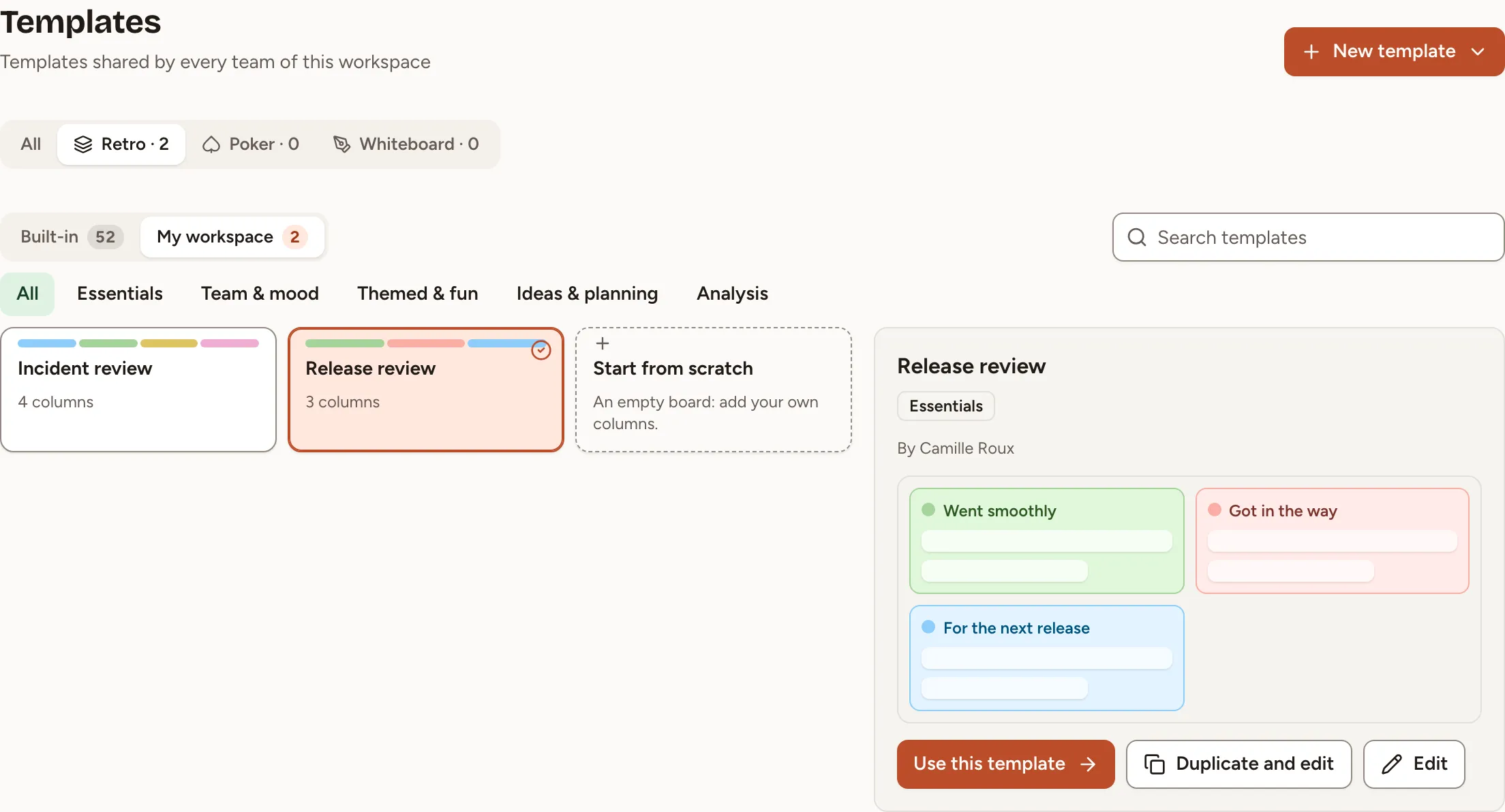
From the preview, Use this template opens the New session dialog of your current team with that template, and Duplicate and edit opens a copy in the editor. On a template you may change, Edit opens the template itself.
Create a template
- Select New template, then Retro template.
- Optionally choose a template under Start from a built-in template to begin with its columns.
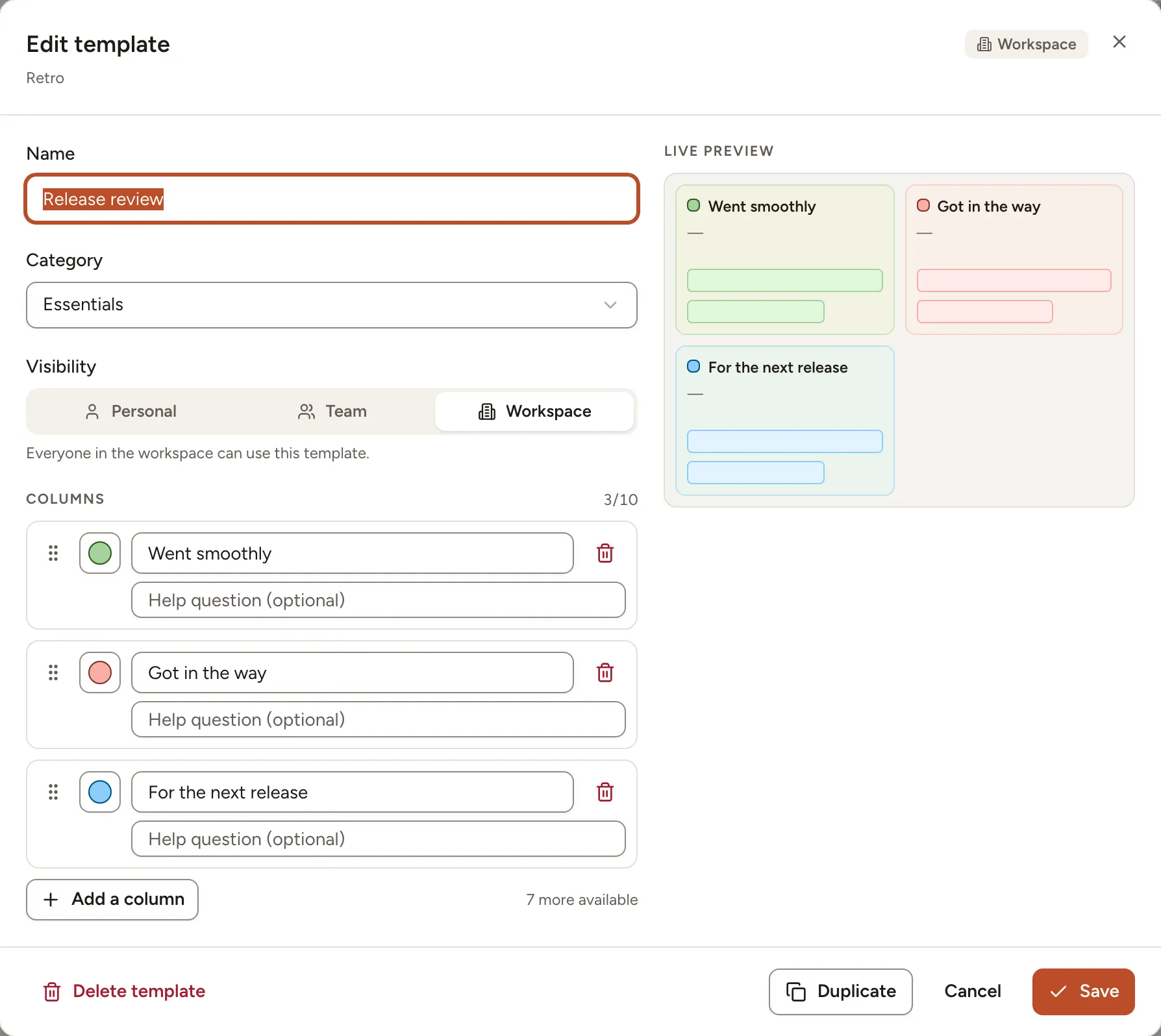
- Give it a Name (80 characters at most, and not the name of another template of the workspace) and a Category.
- Choose its Visibility, see the table below.
- Under Columns, give each column a title, a colour and, if you want, a help question shown under the title on the board. Drag a column to reorder it. Add a column adds one, up to 10.
- Check the Live preview, then select Save.
| Visibility | Who can use the template | Who may give it this visibility |
|---|---|---|
| Personal | Only you | Every member of the workspace |
| Team | Everyone in the team you choose | Owners and facilitators of that team, workspace owners and admins |
| Workspace | Everyone in the workspace | Workspace owners and admins |
The same rule decides who may edit or delete a template afterwards: a personal template belongs to the person who created it, a team template to those who run the team’s rituals, a workspace template to the workspace’s owners and admins.
You can also save a template while creating a retro, with Save as team template in the New session dialog, see Create a retro.
Edit, duplicate or delete a template
- On the Templates page, select the template and then Edit.
- Change what you need and select Save. Duplicate makes a copy instead.
- To remove it, select Delete template and confirm.
Retros already created from a template are not affected when you edit or delete it: the columns were copied into each retro when it was created.
Essentials
- Went well, To improve, Action ideas 3 columns A plain look back at the sprint that ends with steps the team commits to.
- Start, Stop, Continue 3 columns Turns the sprint into three lists of behaviours: what to begin, what to end and what to protect.
- Liked, Learned, Lacked, Longed for 4 columns Looks back over a period through what people valued, learned, missed and wished for.
- Mad, Sad, Glad 3 columns Starts from how people felt about the sprint, then looks for what caused it.
- Thumbs up, Thumbs down, New ideas, Recognition 4 columns Covers the good, the bad, new ideas and thanks on one board that anyone can read at a glance.
- Original 4 4 columns Four plain questions that review the work, keep what was learned and leave open questions in view.
- Starfish 5 columns Sorts the team's practices on a scale of five, from keep to stop, in place of good or bad.
- KALM (Keep, Add, More, Less) 4 columns Tunes how the team works by keeping, adding and adjusting the dose, without asking anyone to stop anything.
- Love, Want, Hate, Learn 4 columns Four sentence openers in the first person that bring out strong opinions, wishes and discoveries.
- Sprint Diagnostics 4 columns Everyone rates the sprint, names its strongest moment and proposes changes; the board ends on agreed actions.
- 3 Ls (Like, Learned, Lacked) 3 columns A quick review of the sprint through what people appreciated, what they learned and what was missing.
- DAKI (Drop, Add, Keep, Improve) 4 columns Sorts the team's practices into what to drop, add, keep and fix, and leads straight to decisions.
- The Good, the Bad and the Ugly 3 columns Separates the problems the team can fix from those it had to endure, and gives the second kind a place.
- Rose, Bud, Thorn 3 columns Looks at what works, what hurts and, between the two, what is only starting and deserves attention.
- Good, Bad, Better, Best 4 columns Reviews the sprint, looks for improvements and ends by naming the outstanding work and the people behind it.
- Likes, Wishes, Wonders 3 columns A gentle format that collects appreciation, wishes and open questions, with no column for problems.
- WWW (Worked well, Kinda worked, Didn't work) 3 columns Sorts what the team tried into successes, half-successes and failures, with the attention on the middle.
- WRAP (Wishes, Risks, Appreciations, Puzzles) 4 columns Looks ahead more than back: what people wish for, whom they thank, which risks they see and what puzzles them.
- Learning Matrix 4 columns Four short labels for what went well, what went badly, ideas for the next sprint and thanks to specific people.
- Liked, Lacked, Change 4 columns Reviews what helped and what held the team back, then asks each person and the whole team what they will change.
- Time: Added, Stolen, Restored 3 columns A retrospective on how each person spends their time: what saves it, what wastes it and how to get it back.
- Good, Bad, Learned, Learning 4 columns Reviews the sprint and follows each person's learning goals from one sprint to the next.
- Plus / Delta 2 columns A two-column review of what to repeat and what to change, quick enough to close any meeting.
Team & mood
- Happy, Meh, Sad 3 columns A quick read of how the sprint felt, with a middle column for what left the team indifferent.
- Kudos 4 columns Opens with thanks to named people, then reviews what went well and what to improve, and ends on steps with an owner.
- Hopes and Fears 2 columns Before the work starts, the team says what it wants the project to become and what could go wrong.
- Safety Check 5 columns An anonymous reading, from 5 to 1, of how freely people feel they can speak in this retrospective.
- Appreciation Retro 5 columns Sentence starters that take the team from what made it glad to its doubts and disappointments, and end on thanks.
- Energy Levels 4 columns Reads the sprint as a battery, what charged people and what drained them, and how the team's energy moved along the way.
- Weather Forecast 4 columns Sorts the sprint into four kinds of weather, from what stopped the team to what went brightly.
- ESVP (Explorers, Shoppers, Vacationers, Prisoners) 4 columns A check-in where each person says, anonymously, in what frame of mind they come to the retrospective.
Themed & fun
- Sailboat 4 columns A picture of a boat helps the team name what drives it, what holds it back, the risks ahead and where it wants to arrive.
- Three Little Pigs 3 columns Sort what the team relies on into houses of straw, sticks and bricks, and decide which weak house to rebuild first.
- Speed Car 2 columns Two columns, what makes the team faster and what slows it down, for a short retro that still ends with a decision.
- Harry Potter 5 columns A complete retro in wizarding dress, with columns for good things, lessons, slowdowns, shout-outs and action items.
- Marie Kondo 3 columns Tidy the team's habits like a cupboard, keeping what brings joy, throwing out what does not work and recycling the rest.
- Game of Thrones 4 columns Four pictures from the saga to review the team's strengths, its current problems, ways to get better and the threats on their way.
- Six Thinking Hats 6 columns Six columns, one way of thinking each, to look at a decision through ideas, facts, feelings, risks and benefits in turn.
- Christmas Retro 4 columns A year-end retro in three tenses, what could have been different, what works now and what the team wishes for, plus a column for fun.
- Halloween: Spooky Sprint 5 columns A whole retrospective in costume, with five columns that are five steps, from setting the scene to closing the session.
Ideas & planning
- Lean Coffee 3 columns An agenda the team builds on the spot: propose topics, vote, then talk them through one at a time, the most wanted first.
- Dot Voting 1 column One list and one vote: the team puts every option on the table and finds out which few it wants to pursue.
- Idea Prioritization 3 columns Sort a pile of ideas into three levels of priority, so the team agrees on what to pick up first and what can wait.
- Pros and Cons 2 columns Put the arguments for and against one option side by side, so the team decides with both in view.
- Kanban 3 columns A shared picture of where the work stands (agreed, in progress, finished) and a decision about what is stuck.
- OKR (Objectives and Key Results) 3 columns Check the team's objectives against the numbers and the work behind them, then agree on what it aims for next.
Analysis
- SWOT Analysis 4 columns A step back from the sprint, to see what the team is good at, where it is weak, and what around it could help or hurt.
- Post-mortem 5 columns A review after an incident, covering what held, what was missing, what each person learned and what will catch the same failure earlier.
- Fishbone Analysis 6 columns One problem, its possible causes sorted into five families, and fixes that answer the causes rather than the symptom.
- RAID Log (Risks, Assumptions, Issues, Dependencies) 4 columns An inventory of what could derail a plan, sorted into risks, unverified assumptions, open issues and what the team is waiting on.
- SOAR Analysis 4 columns A forward look built on what works, from the team's strengths and openings to what it wants to achieve and how it will know.
- Pre-mortem 4 columns Imagine the project has already failed, tell how it happened, and deal with those causes while there is still time.