AI assistants
Connect an AI assistant
Create an API token and add the Skrüm MCP server to an assistant such as Claude Code, so it can read your retrospectives and planning poker games and make the changes you allow.
Skrüm serves a Model Context Protocol (MCP) server. After this page, an assistant that speaks MCP can read your teams’ retrospectives, action items and planning poker games, and change what you allow. Anyone with an account and a verified email address can connect one; a guest cannot.
What a connected assistant can do
The assistant acts as you. It sees the teams you are a member of, and every team of a workspace where you are owner or admin. On a team where you are an observer, it changes nothing.
What it may do depends on the scopes of its token:
| Scope | Label | What it allows |
|---|---|---|
mcp:read |
Read | Read teams, retrospectives, cards, summaries, health checks, ROTI, action items and planning poker games. Always included. |
mcp:write |
Create and update | Change action items, edit cards you wrote, create and run planning poker games. |
mcp:delete |
Delete my messages | Delete cards you wrote. |
The server offers 29 tools and 2 prompts: see Tools reference and Prompts.
Create a token
- Open the user menu and select Settings, then API tokens.
- If the list says Confirm it’s you to see your tokens., select Show my tokens and enter your password.
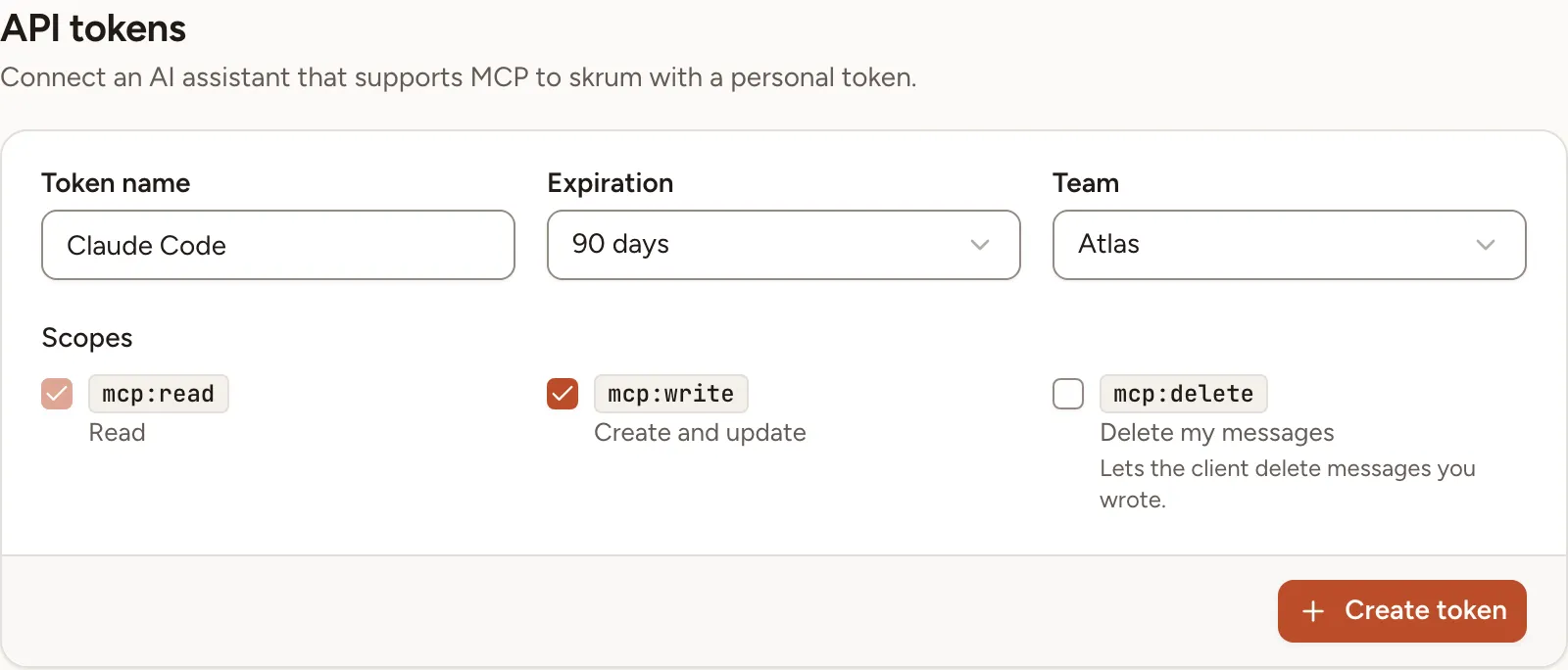
- Enter a Token name, for example the name of the client. It holds up to 60 characters and must differ from your other tokens.
- Choose an Expiration: 30 days, 90 days (the default), 1 year or Never.
- Under Team, keep All my teams or choose one team. A token bound to a team sees that team only.
- Under Scopes, tick Create and update and Delete my messages if the assistant may change things. Read is always ticked.
- Select Create token.
The token appears once, under Copy your token now. You won’t be able to see it again. Skrüm keeps only a hash of it. You can hold at most 25 active tokens.
If API tokens is missing from your settings, your email address is not verified or the instance has turned the server off.
Add the server to your client
The address of the server is your instance’s address followed by /mcp. It is shown under MCP server, in the Server URL field.
Under the new token, two tabs hold the configuration with your address and your token already filled in. Select Copy configuration, then Done.
Claude Code, in a terminal:
claude mcp add --transport http skrum https://skrum.example.com/mcp --header "Authorization: Bearer <token>"Connect Claude Code to tools via MCP documents this command.
Other clients (JSON), in the place the client’s documentation names:
{
  "mcpServers": {
    "skrum": {
      "type": "http",
      "url": "https://skrum.example.com/mcp",
      "headers": {
        "Authorization": "Bearer <token>"
      }
    }
  }
}
To check the connection, ask the assistant to list your Skrüm teams. After its first request, the Last used column of the token shows today’s date.
There is no OAuth sign-in
The server accepts one thing: a token in the Authorization header. A client must be able to send that header. Connectors that require a sign-in through OAuth cannot connect.
What stays hidden from an assistant
A tool returns what you would see on the screen, and nothing more:
- other people’s cards while the board still hides them;
- the authors of cards on an anonymous board, except your own;
- who voted for which card, and vote totals while the board hides them;
- other people’s health check answers and ROTI ratings;
- other players’ poker cards before the reveal, and who played which card in an anonymous round;
- email addresses, guest links of retrospectives and credentials of integrations.
poker.game.getreturns the guest link of a planning poker game only while guest access is on.
No tool casts a vote or sets an estimate of your choosing.
Data you read through this connection is sent to the AI application you use.
Revoke a token, limits
To cut a client off, select Revoke on the token’s row, then Revoke in the dialog: the client loses access on its next request. Changing your password does not revoke a token. An instance admin can revoke anyone’s token under MCP keys.
A token makes at most 120 requests a minute, of which 30 changes and 20 searches. Whoever hosts the instance changes the first two with SKRUM_MCP_RATE_LIMIT and SKRUM_MCP_WRITE_RATE_LIMIT, and turns the server off with SKRUM_MCP_ENABLED=false: see Configuration reference.