Administration
Point Skrüm at your SMTP server, send a test message, and know what happens to mail until then.
In Administration, SMTP is where an instance admin sets the mail server Skrüm sends through and tests it. Changing a value needs a password confirmation from the last five minutes; when yours is older, select Confirm in the line at the top of the page.
Until mail is set
Out of the box, MAIL_MAILER is log: Skrüm sends nothing and writes every mail to the application log. The page then shows Not configured and “Mails are written to the log.”
That covers what Skrüm sends by email, among which: address verification and password reset links, workspace invitations, magic links, two-factor codes, action item reminders, retrospective results, and the alert sent to instance admins when the sign-in or mail configuration changes. Nobody receives them until a mail server is set.
Set the server
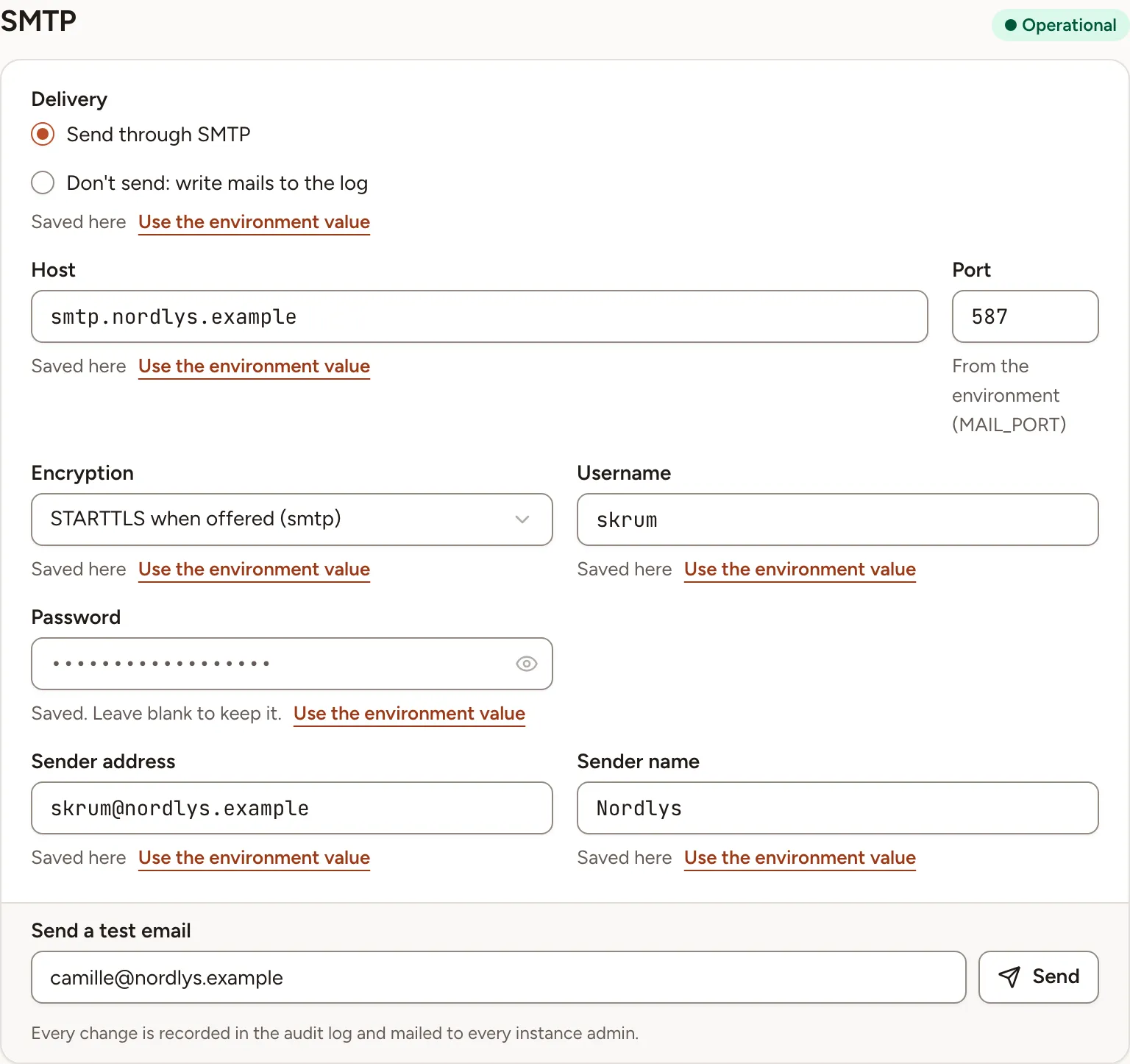
- Under Delivery, choose Send through SMTP.
- Fill in the fields of the table below.
- Select Save, in the bar at the top right.
| Field | Environment variable | Notes |
|---|---|---|
| Delivery | MAIL_MAILER |
Send through SMTP, or Don’t send: write mails to the log |
| Host | MAIL_HOST |
|
| Port | MAIL_PORT |
|
| Encryption | MAIL_SCHEME |
See below |
| Username | MAIL_USERNAME |
|
| Password | MAIL_PASSWORD |
Never shown. Leave the field blank to keep the saved one |
| Sender address | MAIL_FROM_ADDRESS |
The address mails are sent from |
| Sender name | MAIL_FROM_NAME |
Encryption has three choices:
| Choice | Meaning |
|---|---|
| None | Nothing is saved for the encryption. When the environment sets one, it cannot be turned off from here |
| TLS on connect (smtps) | The connection is encrypted from the start |
| STARTTLS when offered (smtp) | The connection starts in clear and switches to TLS when the server offers it |
Under each field, a line says where the value comes from: Saved here, or “From the environment” with the name of the variable. A value saved here wins over the environment, and Use the environment value removes the saved value when you save.
While Don’t send: write mails to the log is chosen, the server fields are disabled. If the environment names a mailer other than smtp or log, the card says “Another mailer from the environment” with its name, and that mailer stays in use until you choose one of the two options.
Once mail is delivered through a server, the page shows Operational.
Every change is recorded in the audit log and mailed to every instance admin. The alert is sent through the configuration that was in force before the change.
Send a test email
- Save your changes first: the test uses the saved values.
- Under Send a test email, check the address. It starts as your own.
- Select Send.
The result stays under the field until the next test: “Last test delivered”, or “Last test failed” followed by the reason.
| Reason | Meaning |
|---|---|
| “no email was sent, mails are written to the log.” | Delivery is still set to the log |
| “the mail server could not be reached or refused the message.” | Check the host, the port, the encryption and the credentials |
| “an unexpected error stopped the email.” | The error is in the application log |
You can send five tests in ten minutes; after that the page asks you to wait a few minutes. Each test is recorded in the audit log.